
Automations
Automations lets your AI agents reach out to customers and reply on their own, without a person typing each message. You can send a message to many contacts at once, send a timed series of messages, or answer comments on social posts automatically. Everything is tied to an AI agent and the channel it is connected to.
Prerequisites
An AI agent that is connected to at least one channel. See Create your first AI Agent.
A role with access to Automation. [CHECK: the PRDs say a new permission level is added for Automations, one for each part. Confirm the exact roles and what customers see without access.]
[CHECK: availability. The PRDs say Broadcasts, Drip Campaigns, Auto Replies and WhatsApp Templates in the new Automation menu are behind a feature flag that is off by default. Confirm that the new pages are live for your customers before you publish this page.]
Where To Find Automations
Click Automation in the left menu. The Automation sidebar opens next to the page.
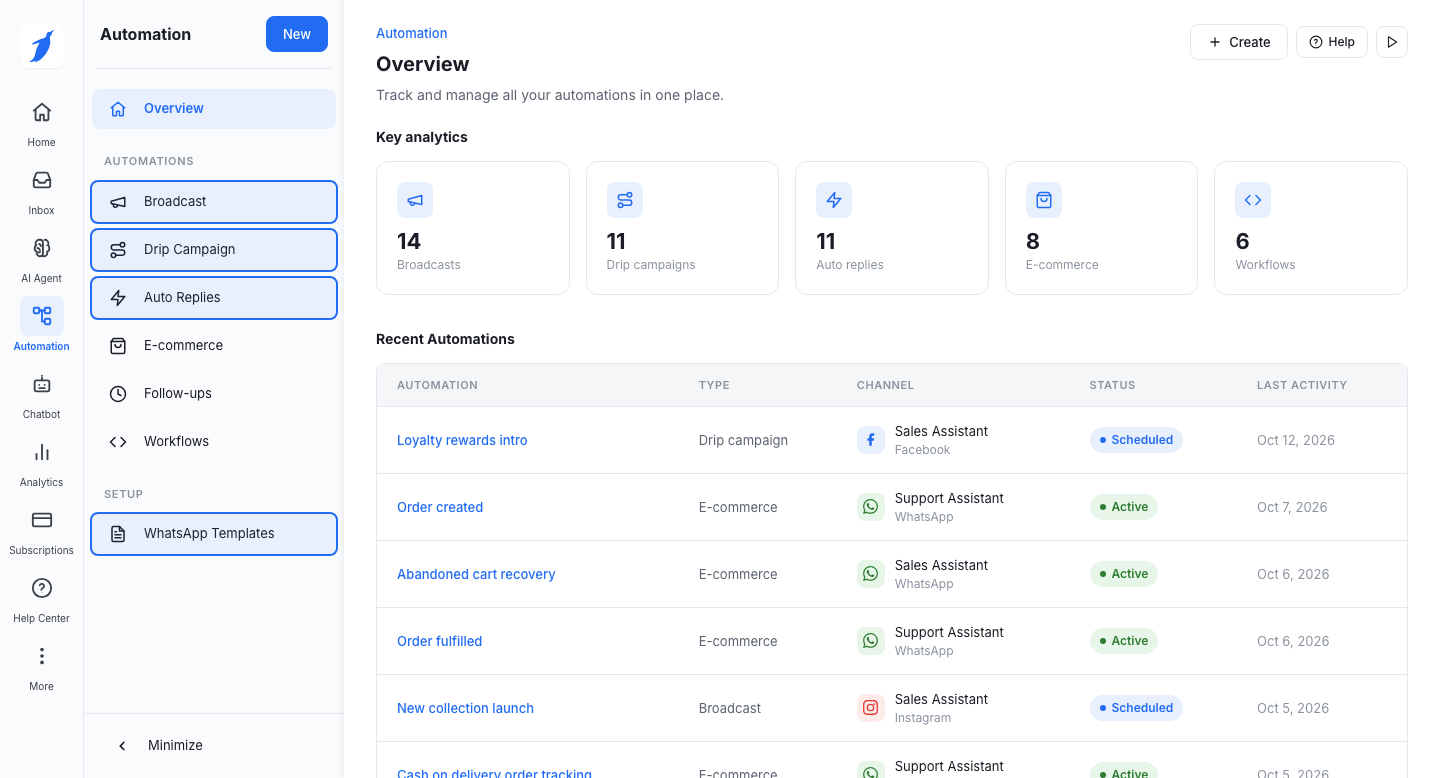
The sidebar has two groups:
Automations: Overview, Broadcast, Drip Campaign, Auto Replies, E-commerce, Follow-ups and Workflows.
Setup: WhatsApp Templates.
Overview opens first. It shows key numbers and your recent automations. This guide covers Broadcast, Drip Campaign, Auto Replies and WhatsApp Templates. E-commerce, Follow-ups and Workflows are also in the menu. They are not covered here.
[CHECK: the PRDs call the menu "Automations" and the tabs "Broadcasts" and "Drip Campaigns". The prototype shows "Automation" in the left menu, and "Broadcast" and "Drip Campaign" in the sidebar. This guide uses the prototype's names. Confirm.]
Key Definitions
Automation
Any message or reply your AI agent sends on its own, set up in this section.
Broadcast
One message sent once to a list of contacts.
Drip campaign
A series of messages sent over time to contacts who join it.
Auto reply
An automatic reply to comments on your Instagram or Facebook posts.
WhatsApp template
A message format approved by WhatsApp. WhatsApp broadcasts and drips use templates.
Contact group
A saved list of contacts that you can pick as an audience.
The Parts Of Automations
What it does
Sends one message, now or later, to many contacts at once.
Sends a timed series of messages to each contact who joins.
Replies to comments on your posts, and can also send a direct message.
Channels
WhatsApp, Instagram, Facebook and Telegram
WhatsApp, Instagram, Facebook and Telegram
Instagram and Facebook
Who gets it
Contacts from a CSV file, contact groups, or a Google Sheet. WhatsApp only: all three. The other channels: contact groups.
Contacts you choose: all contacts, groups, or contacts that match rules. The options depend on the channel.
People who comment on the posts you choose, with or without keywords.
When to use it
Announcements, offers, reminders and updates that go out once.
Onboarding, nurturing a lead, or follow-ups after an event.
Keeping up with comments on posts, reels, stories and live videos.
Needs a template
WhatsApp: yes, an approved template.
WhatsApp: yes, an approved template.
No. You write the reply, or the AI agent does.
[CHECK: the PRDs list SMS as "coming soon" for Broadcasts. The prototype does not show SMS. This guide leaves SMS out. Confirm.]
How The Parts Fit Together
WhatsApp Templates is the setup part. On WhatsApp you can only send a broadcast or a drip message with a template that WhatsApp has approved. Create and manage your templates first. Only approved templates show in Broadcasts and Drips.
Broadcasts and Drip Campaigns both choose an AI agent and one of its connected channels. They then choose who receives the messages and what is sent.
Auto Replies react to comments. They do not need an audience list or a template.
After a customer replies to a broadcast or a drip message, a live chat opens in the Inbox or the AI agent takes over, depending on what you set. See each guide for details.
[CHECK: the PRDs describe the reply setting differently from the prototype for Broadcasts and Drips. See the Broadcasts and Drip Campaigns guides.]
Where To Go Next
Send a Broadcast
Create a Drip Campaign
Create an Auto Reply
Create a WhatsApp Template
Common Errors
Related Articles
Send a Broadcast
Create a Drip Campaign
Create an Auto Reply
Create a WhatsApp Template
Support
Still not working? Write to us at support@botpenguin.com. We will reach out to you within 24 hours.